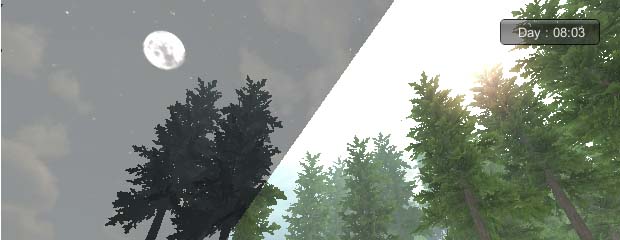
Unity3D: Advance Skybox Blending for Day Night Cycle
Complete the day-night cycle with a custom blended skybox shader: two skybox sets and a blend factor driven by the day phase controller.
Last time I created a day night cycle with smooth light and fog transition. Now I will perfect that cycle by adding a skybox transition between day and night. For this functionality we need a custom skybox shader that contains 2 skybox texture sets and a blend factor with range [0-1] to combine them.
This custom shader was created by Aras Pranckevicius in his article on the Unify Community (Unity wiki). I use it together with the DayNightController script from the previous article.
The Blended Skybox Shader
Create a new shader named SkyboxBlend and copy this code:
Shader "RenderFX/Skybox Blended" {
Properties {
	_Tint ("Tint Color", Color) = (.5, .5, .5, .5)
	_Blend ("Blend", Range(0.0,1.0)) = 0.5
	_FrontTex ("Front (+Z)", 2D) = "white" {}
	_BackTex ("Back (-Z)", 2D) = "white" {}
	_LeftTex ("Left (+X)", 2D) = "white" {}
	_RightTex ("Right (-X)", 2D) = "white" {}
	_UpTex ("Up (+Y)", 2D) = "white" {}
	_DownTex ("Down (-Y)", 2D) = "white" {}
	_FrontTex2("2 Front (+Z)", 2D) = "white" {}
	_BackTex2("2 Back (-Z)", 2D) = "white" {}
	_LeftTex2("2 Left (+X)", 2D) = "white" {}
	_RightTex2("2 Right (-X)", 2D) = "white" {}
	_UpTex2("2 Up (+Y)", 2D) = "white" {}
	_DownTex2("2 Down (-Y)", 2D) = "white" {}
}

SubShader {
	Tags { "Queue" = "Background" }
	Cull Off
	Fog { Mode Off }
	Lighting Off
	Color [_Tint]
	Pass {
		SetTexture [_FrontTex] { combine texture }
		SetTexture [_FrontTex2] { constantColor (0,0,0,[_Blend]) combine texture lerp(constant) previous }
		SetTexture [_FrontTex2] { combine previous +- primary, previous * primary }
	}
	Pass {
		SetTexture [_BackTex] { combine texture }
		SetTexture [_BackTex2] { constantColor (0,0,0,[_Blend]) combine texture lerp(constant) previous }
		SetTexture [_BackTex2] { combine previous +- primary, previous * primary }
	}
	Pass {
		SetTexture [_LeftTex] { combine texture }
		SetTexture [_LeftTex2] { constantColor (0,0,0,[_Blend]) combine texture lerp(constant) previous }
		SetTexture [_LeftTex2] { combine previous +- primary, previous * primary }
	}
	Pass {
		SetTexture [_RightTex] { combine texture }
		SetTexture [_RightTex2] { constantColor (0,0,0,[_Blend]) combine texture lerp(constant) previous }
		SetTexture [_RightTex2] { combine previous +- primary, previous * primary }
	}
	Pass {
		SetTexture [_UpTex] { combine texture }
		SetTexture [_UpTex2] { constantColor (0,0,0,[_Blend]) combine texture lerp(constant) previous }
		SetTexture [_UpTex2] { combine previous +- primary, previous * primary }
	}
	Pass {
		SetTexture [_DownTex] { combine texture }
		SetTexture [_DownTex2] { constantColor (0,0,0,[_Blend]) combine texture lerp(constant) previous }
		SetTexture [_DownTex2] { combine previous +- primary, previous * primary }
	}
}

Fallback "RenderFX/Skybox", 1
}
Material Setup
Create a new Skybox material using shader RenderFX > Skybox Blended, set the blend slider to 0, and apply skybox textures according to this rule:
- Put Day Skybox (front) texture to "Front"
- Put Night Skybox (front) texture to "2 Front"
- Put Day Skybox (up) texture to "Up"
- Put Night Skybox (up) texture to "2 Up"
- And also put left, right, back, down textures according to their variables
Assign Render Settings > Skybox material to this custom material.
Driving the Blend from the Day Phase
Add a new variable to the DayNightController:
// blend value of skybox using SkyBoxBlend Shader in render settings range 0-1
private float SkyboxBlendFactor= 0.0f;
Create UpdateSkyboxBlendFactor():
private void UpdateSkyboxBlendFactor(){
	if (currentPhase == DayPhase.Dawn)
	{
		float relativeTime = currentCycleTime - dawnTime;
		SkyboxBlendFactor = 1 - (relativeTime / halfquarterDay);
	}
	else if (currentPhase == DayPhase.Day)
	{
		SkyboxBlendFactor = 0.0f;
	}
	else if (currentPhase == DayPhase.Dusk)
	{
		float relativeTime = currentCycleTime - duskTime;
		SkyboxBlendFactor = relativeTime / halfquarterDay;
	}
	else if (currentPhase == DayPhase.Night)
	{
		SkyboxBlendFactor = 1.0f;
	}

	RenderSettings.skybox.SetFloat("_Blend", SkyboxBlendFactor);
}
Finally, call UpdateSkyboxBlendFactor() in Update() after updating the ambient light of the game world.